


If
We’ve introduced the URLgenius MCP server to bring link creation and management into those conversations. The URLgenius Plugin for Claude is now available . When you connect your URLgenius account to Claude, you can ask it to create links, generate QR codes, find existing links, or ask questions about your account.
The URLgenius Plugin for ChatGPT is also available now.
Important note: If you have a subaccount make sure you are logged into your company's main account when using the Claude Plugin. The ability to switch between different subaccounts will be released soon.
Find URLgenius for Claude in the Claude Plugin Directory and see the URLgenius Knowledgebase for instructions on how to connect your Claude and URLgenius accounts.
The Claude plugin can be used by anyone with a URLgenius account. You might be a creator sharing product recommendations, a marketplace seller preparing attribution links for social ads, a brand promoting content in your own app, or an agency sending audiences to a retailer or social platform.
Connecting Claude to URLgenius
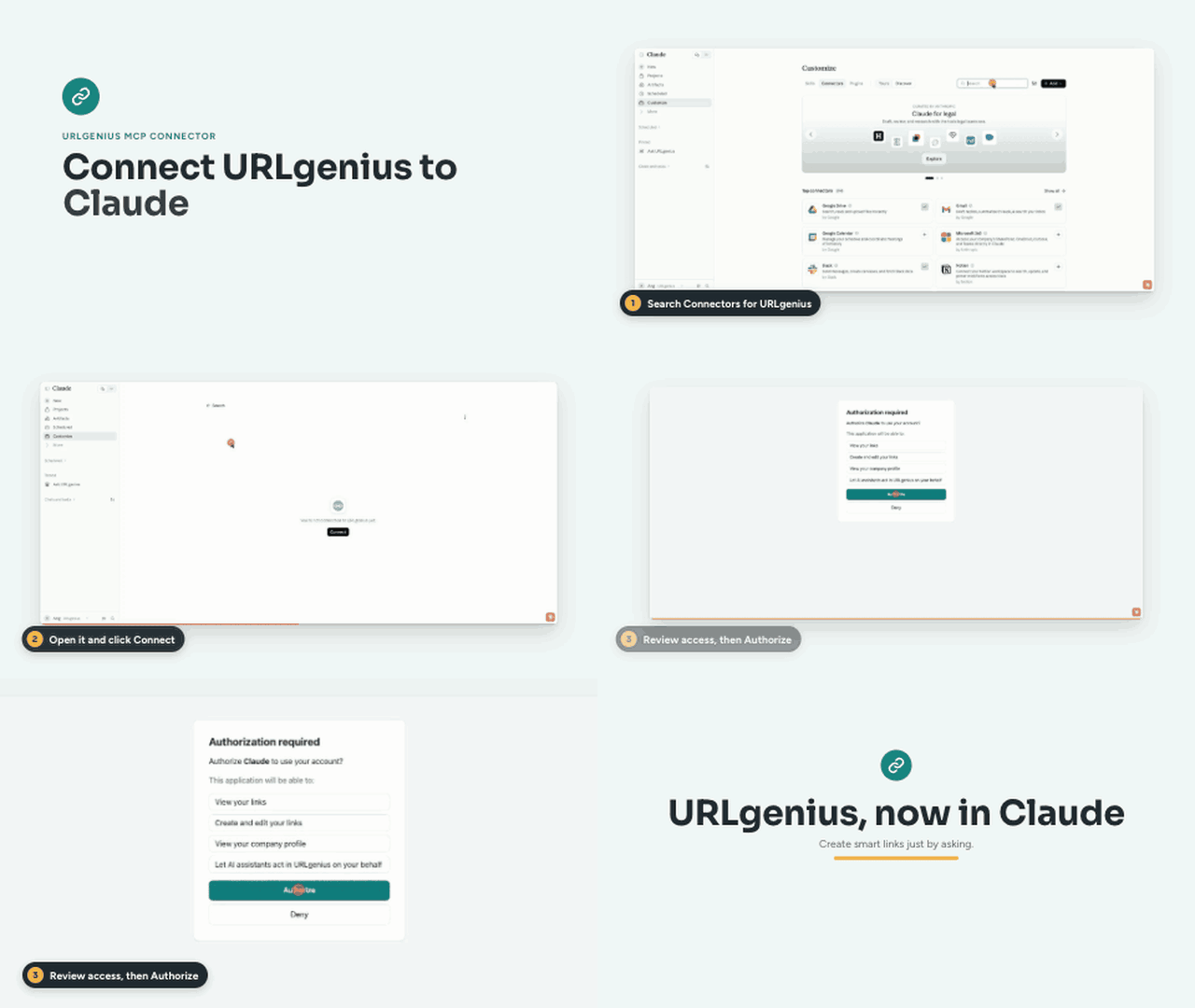
As you bring AI agents into more of your work, creating and managing app deep links should fit naturally into that process. That’s what this connection makes possible.
Connect URLgenius to Claude: setup instructions and examples.
What can the URLgenius MCP connection for Claude and ChatGPT do?
MCP stands for Model Context Protocol. It gives AI tools such as Claude and ChatGPT a way to connect to services like URLgenius to perform tasks with your authorization.
Once connected, you can ask Claude to create app deep links for supported apps and in-app destinations. You can include campaign tags just like you normally would when using the URLgenius Composer including attribution parameters for Amazon and other apps. You can also do things like retrieve links and ask questions about your account. This applies to branded links or to links that use the URLgenius domain.
The benefit is straightforward: you can choose to work in Claude or ChatGPT when it suites you as you compose links, check reporting, or complete other tasks.
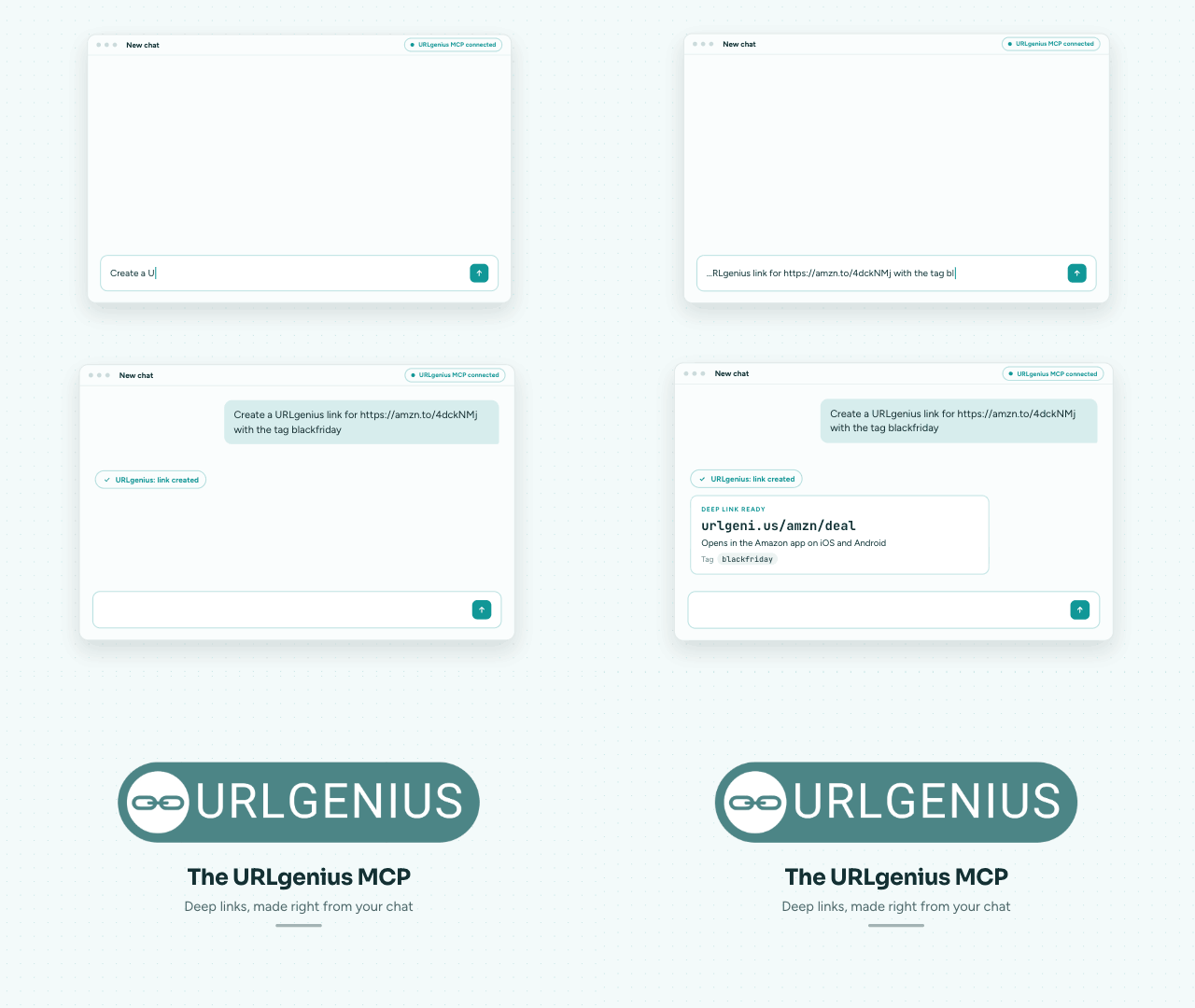
How different customers can use it
The destination and the campaign may differ, but each customer group has work that can move faster with this connection.
Creators: Get product links ready while developing content and ask account-related questions
Suppose you’re putting together a seasonal idea list. You’ve selected the products and you’re using Claude to work on the content. You can provide the Amazon Associate or other affiliate URLs and ask it to create the corresponding URLgenius links, tagged for that idea list.
You don’t have to leave the conversation to create each link separately. Later, you can ask Claude to find those links or to check how much traffic the links are getting.
For creators publishing frequently, this gives link creation a natural place in the content process.
Marketplace sellers: Prepare links for larger campaigns
Amazon is bringing more of sellers’ business operations into AI tools. Its new Amazon Selling Partner plugin, available in beta with Claude, connects sellers’ Amazon data and Seller Central insights providing another surface for marketplace teams to work.
For marketplace sellers adopting those tools, URLgenius for Claude is a natural addition. When you’re planning campaigns that send shoppers to your Amazon Storefront or product listings from social ads, email or creator content, you also need app links that open to the right product or storefront in the Amazon app.
Amazon itself recommends supplementing Amazon Attribution links with a mobile deep-linking service, especially for traffic from social apps, to prompt shoppers to open the Amazon app. URLgenius for Claude helps sellers put that recommendation into practice by letting campaign managers scale their Amazon Atribution links and corresponding app deep links in parallel.
You can give Claude your existing Amazon Attribution links and ask it to create URLgenius app links that carry those attribution parameters. For larger promotions, you can create links in bulk and apply shared campaign tags, then find and update them as promotions change.
That brings another part of campaign preparation into the same conversation, helping you move faster as you expand your advertising and promotional activity.
Brands with their own apps: Link to the in-app content you want customers to reach
If your brand has an app, you can use the MCP connection for Claude or ChatGPT to create links to supported in-app destinations, such as products, offers and app link to other content, tasks or screens in the app.
Your app-open links can be used across email, SMS, social content, paid media where supported, and QR codes. URLgenius handles the app-open experience and provides a fallback your marketing team can control when the app is not installed.
For example, a team planning a product launch could create all the app links and QR codes it needs for the campaign in Claude. If you're using the branded domain feature and and adding campaign tags in the process than you app links created with Claude will automatically reflect those details. As the campaign develops, the team can find those links and QR Codes and update the destinations in the same conversation.
Marketers and agencies: Connect campaigns to third-party apps
You don’t need to own an app to benefit from the URLgenius MCP for Claude and ChatGPT.
An agency might be promoting an Instagram profile, a TikTok video or a product on a retailer’s app. URLgenius supports third-party destinations including social media apps like Facebook, Instagram and TikTok as well as retail apps like Amazon, Walmart and Target.
You can create app deep links for those destinations and organize them with client or campaign tags within the connected account. When a campaign changes, you can ask Claude to find the relevant app links or QR codes and update them.
This gives marketers a way to mangage app linking on their preferred answer agent surface to make sure every campaign, link and QR code is set to where their audience needs to go with the least about of friction possible.
Scaling means keeping links manageable, too
Creating a batch of links is useful. Finding the right link a month later is useful, too.
As campaigns grow, naming and organization become more important. You can ask Claude to apply a shared campaign tag when creating links, then use that tag to retrieve them later.
You can also search by destination, custom path or last-updated date. Questions can be as simple as:
- “Show me the links tagged fall-launch and their destinations.”
- “Do I already have a link for this product page?”
- “Which links in this campaign were updated since October 1?”
These questions are about the links in your account—their destinations, tags and other details. The current connector does not provide campaign performance analytics.
For teams learning how to use AI agents in their operations, this is a practical place to start. Create the links for a campaign, organize them consistently and keep managing them as the work progresses.
Start with a campaign you’re already working on
You don’t need to redesign your entire marketing operation to try this.
Start with the type of links you're already creating with the Composer, an app link or social destination. Bring the URLs into Claude and ask it to create your URLgenius links. Or try asking Claude to find a link you already created or ask some questions about the links or traffic you're getting.
That gives you a concrete way to see where conversational app link creation and management fits into your answer agent work. As you become more familiar with it, you can use the same approach for larger campaigns and more channels.
Any URLgenius customer can connect an account. Claude can access the links belonging to the company associated with the account you authorize. ChatGPT support is coming soon.
Find URLgenius for Claude in the Claude Plugin Directory and see the URLgenius Knowledgebase for instructions on how to connect your accounts.
New to URLgenius? Sign up for a free trial.
Frequently Asked Questions
Can I create app links with Claude?
Yes. Connect your URLgenius account to Claude using the URLgenius MCP server, then ask it to create links from supported destination URLs.
Can I create multiple links at once?
Yes. You can provide multiple URLs in one request and ask Claude to create links with shared campaign tags.
Can I use it for apps my company doesn’t own?
Yes. The connection supports URLgenius links to supported third-party apps as well as your own app. That includes use cases for creators, marketplace sellers, marketers and agencies.
Can I create branded links and QR codes?
Yes. You can generate QR codes and create links using a branded domain already connected to your URLgenius account, with optional custom paths.
Can I update links that are already published?
Yes. You can change an existing link’s destination while keeping its URL the same, allowing you to continue using shared links and printed QR codes.
Is URLgenius available with ChatGPT?
Yes the URLgenius Plugin for ChatGPT is available now in the ChatGPT Plugin Directory.